Cursor IDE: A Practical Deep Dive for Shipping Faster
Cursor IDE blends familiar editor workflows with AI-native tooling so you can move from idea to implementation without leaving your context. This post is a hands-on guide focused on effective, repeatable habits rather than one-off tricks.
Why Cursor Feels Different
Cursor is not just “AI inside an editor.” It is an editor that treats AI as a first-class collaborator across reading, writing, and refactoring. The core value is tighter feedback loops:
- You can ask for context-aware explanations without leaving your repo.
- You can make changes with confidence because diffs are explicit.
- You can minimize interruptions by keeping the work inside your editor.
Mental Model: Think in Loops
The most productive users treat Cursor as a looped system, not a chatbot. Each loop is small, concrete, and reviewable.
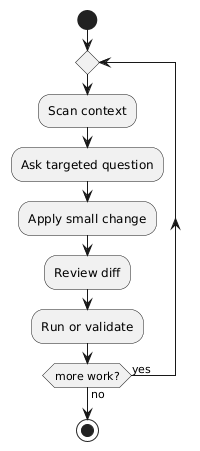
The loop keeps scope tight and makes it easy to spot regressions early.
Core Modes and When to Use Them
Cursor’s value multiplies when you choose the right interaction mode for the job.
| Mode | Best for | Typical prompts | Risk if misused |
|---|---|---|---|
| Ask | Understanding code | “Where is X handled?” | Shallow answers if you ask too broadly |
| Edit | Small, scoped changes | “Rename this prop everywhere” | Overreach if the request is vague |
| Agent | Multi-step tasks | “Add a new feature with tests” | Drift if you don’t review diffs |
| Debug | Runtime investigation | “Why is this failing in CI?” | Slower if used for design tasks |
Tip: default to Ask for understanding, Edit for one-file changes, Agent for multi-step work, and Debug when you need evidence.
A Practical Workflow
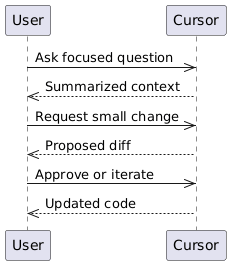
Here is a repeatable workflow that scales from small edits to large features:
- Define the outcome: write a one-line goal.
- Inspect relevant files: skim imports and entrypoints.
- Ask for a surgical change: avoid broad requests.
- Review the diff: verify names, types, and edge cases.
- Run a fast check: lint, unit test, or a smoke test.
How to Ask for Better Results
The key is specificity. Give the model boundaries and a definition of done.
Good prompt
- “Update the error message in
auth-helpers.tsto mention password rules and add a unit test.”
Bad prompt
- “Fix auth.”
To make prompts reliable, include:
| Signal | Example | Why it helps |
|---|---|---|
| File or module | “auth-helpers.ts“ | Anchors the change |
| Scope | “Only update validation error text” | Limits side effects |
| Constraints | “No new deps” | Avoids tech churn |
| Verification | “Run unit test X” | Confirms success |
Cursor Rules: Keep AI Aligned
Cursor Rules let teams set consistent guidance for AI interactions. Think of them as lightweight, versioned instructions that live with your code. They help prevent style drift and keep suggestions aligned with your standards.
Where to keep rules
Most teams use a repository-level rules file so every contributor shares the same AI behavior. Cursor supports a project rules file at the repo root (commonly named .cursorrules). Some versions also support a .cursor/rules/ directory for splitting rules by topic. Use one canonical location and document it in your README.
Example layout:
repo-root/
  .cursorrules
  .cursor/
    rules/
      api.md
      frontend.md
Format and file extensions
Rules are plain text and work best as short, declarative bullets. If you use a single file, .cursorrules has no extension. If you split rules, Markdown (.md) keeps them readable. Keep each rule:
- One sentence
- Easy to verify in a diff
- Written in imperative form (“Use”, “Avoid”, “Prefer”)
Scoping rules
Scope rules to a directory or file pattern to avoid accidental overreach. A simple convention is to start with a “When editing…” line, followed by bullets.
When editing files under src/api/:
- Use the shared apiClient.ts wrapper.
- Do not add new dependencies.
- Return user-friendly error messages.
Rule placement guide
| Location | Scope | Format | Best for |
|---|---|---|---|
.cursorrules | Entire repo | Plain text | Small projects, single team |
.cursor/rules/*.md | Topic or directory | Markdown | Larger teams, modular rules |
| Editor settings | Per user | UI / local | Personal preferences |
What rules are good at:
- Enforcing naming, formatting, and import conventions
- Restricting dependency usage
- Defining test expectations for new changes
- Adding domain-specific guardrails
Example rule snippet
Rules:
- Use existing utils before adding new helpers.
- Prefer TypeScript types over interfaces in new files.
- All new features require unit tests.
Example of a scoped rule
When editing files under src/api/:
- Do not add new dependencies.
- Use fetch wrapper from apiClient.ts.
- Keep error messages user-friendly.
Good prompt with rules in mind
- “Add a new API call in
src/api/users.tsusingapiClient.ts, no new deps, and include a unit test.”
Rules are most effective when they are short, concrete, and easy to verify in a diff.
Using Cursor for Code Reading
Cursor shines at three reading tasks:
| Task | Prompt style | Example |
|---|---|---|
| Locate | “Where is X handled?” | “Where is the login redirect set?” |
| Explain | “How does X work?” | “How do we build the report data?” |
| Trace | “What happens after X?” | “What happens after createUser?” |
Keep questions narrow. If the answer is too broad, ask for a follow-up focusing on a single file or function.
Refactors Without Chaos
Refactoring with Cursor works best when you:
- Split the refactor into mechanical edits and behavioral changes.
- Validate each step with a quick check.
- Keep the diff readable (small chunks, clear intent).
Example breakdown:
- Rename a symbol across files.
- Update tests to match naming.
- Confirm formatting and lint checks.
Tables for Decision-Making
When deciding whether to delegate to Cursor or do it manually, use a simple rubric.
| Task Type | Cursor is great when… | Prefer manual when… |
|---|---|---|
| Boilerplate | You know the pattern | The pattern is unclear |
| Refactor | You can define boundaries | The behavior is fragile |
| Debugging | You have logs or errors | The bug is intermittent |
| Documentation | You can outline sections | The tone is highly personal |
Common Pitfalls (and Fixes)
| Pitfall | Symptom | Fix |
|---|---|---|
| Vague request | Large, unexpected diff | Add constraints and file scope |
| Missing context | Incorrect assumptions | Provide file hints or read key files first |
| No verification | Regressions | Run a fast test loop |
| Over-trusting output | Subtle bugs | Read diffs like PR reviews |
A Simple “AI-Ready” Checklist
Use this list before delegating a change:
- I can describe the outcome in one sentence.
- I know which files are likely impacted.
- I have a quick way to validate.
- I can review the diff quickly.
If any item is false, tighten scope or gather more context first.
Example: Turning a Bug Report Into a Cursor Task
Bug report: “The toast message is blank when saving a profile.”
Good request
- Identify where the toast is built.
- Ensure the message text is non-empty.
- Add a quick regression test if one exists.
The clarity here removes guesswork and keeps the change tight.
Integrating Cursor Into Daily Work
Treat Cursor like a pair programmer:
- Let it handle repetitive edits.
- Use it to surface relevant context quickly.
- Keep final responsibility on the human review.
Final Thoughts
Cursor IDE becomes most powerful when you adopt a looped workflow, ask specific questions, and review diffs with intention. Use it to compress feedback cycles and keep your momentum without sacrificing code quality.
If you want to go further, try:
- A micro-refactor (rename a type across the codebase).
- A doc rewrite with a strict outline.
- A debugging session where you only feed errors and logs.